


Download Watermark Express – Free Secure Watermarking Tool for Windows
Overview
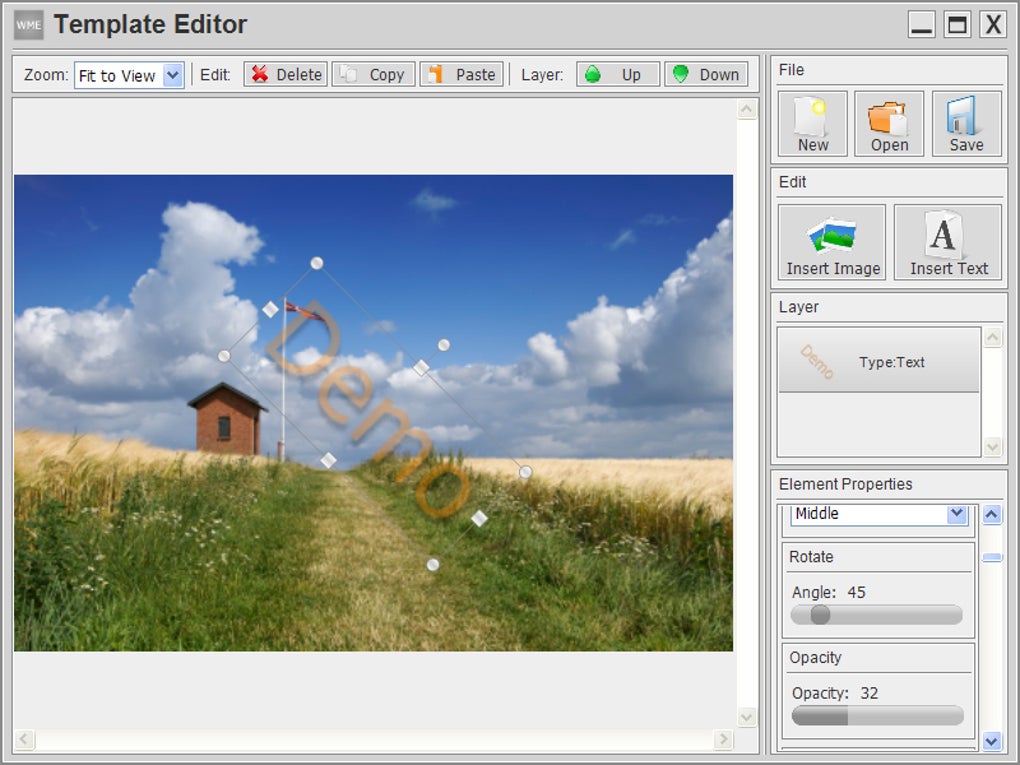
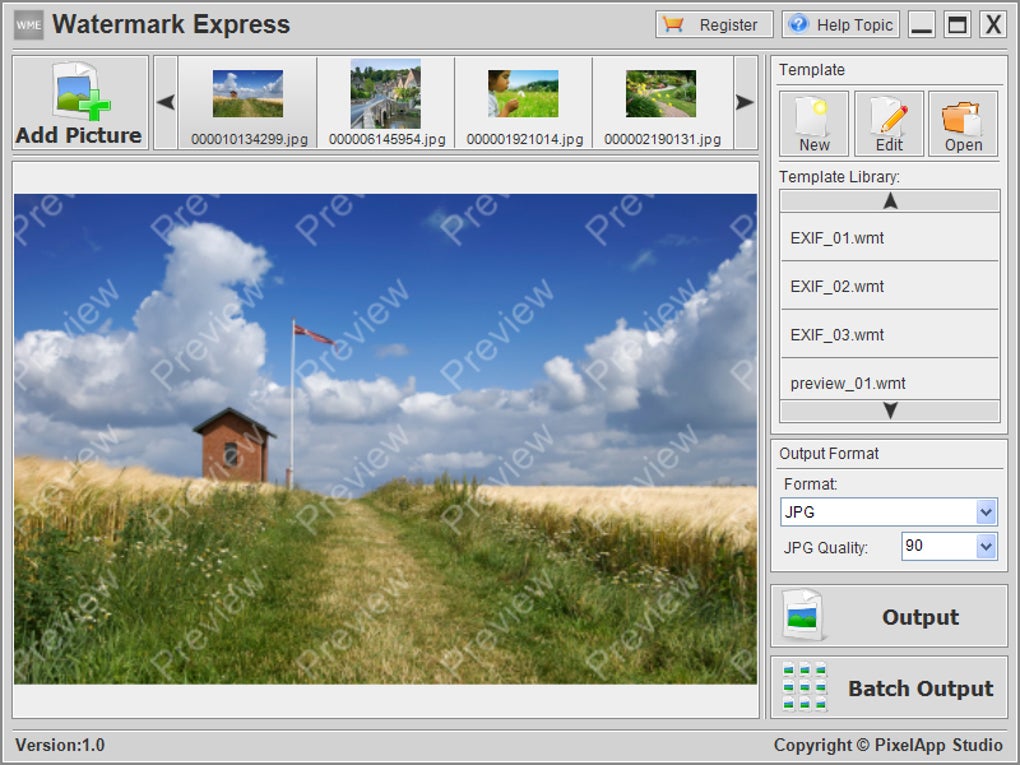
Watermark Express, crafted by Pixelapp Studio, is a professional‑grade watermarking solution built specifically for Windows users who need a reliable way to protect their digital photos. In today’s image‑driven world, photographers, designers, and hobbyists alike risk having their work copied or misused without proper attribution. Watermark Express solves that problem by allowing you to embed text, logos, EXIF metadata, or custom graphics directly onto your images. The software’s multilayer watermark template editor gives you full creative control, while its intelligent auto‑scaling feature ensures that every watermark looks perfect regardless of the original photo size. Whether you are processing a single portrait or a batch of hundreds of images, Watermark Express streamlines the workflow with a powerful batch processor that applies your chosen watermarks in seconds. The program also supports a range of visual effects—including shadows, noise, transparency, and rotation—so you can create watermarks that are both subtle and unmistakable. All of these capabilities come wrapped in an intuitive interface that makes adding protection to your photos as easy as a few clicks, freeing you to focus on what matters most: creating great visual content.
Key Features
- Multilayer Template Editor: Build complex watermarks with text, images, and EXIF data on separate layers for ultimate flexibility.
- Automatic Size Adjustment: Watermark elements automatically scale to match each photo’s dimensions, preserving visual balance.
- Batch Processing Engine: Apply watermarks to dozens or hundreds of photos in a single operation, saving time on large projects.
- Rich Visual Effects: Add shadows, noise, transparency, rotation, and color blending to make watermarks blend naturally or stand out boldly.
- EXIF Integration: Insert camera settings, date, location, and other metadata as part of the watermark for added authenticity.
- Custom Logo Support: Upload your brand’s logo in PNG, JPEG, or SVG format and position it precisely on each image.
- Pre‑set Templates: Choose from a library of ready‑made watermark designs to jump‑start your workflow.
- Secure Output Formats: Save watermarked images in JPG, PNG, TIFF, or BMP without loss of quality.
- Undo & Preview: Real‑time preview lets you see changes instantly, and an undo stack protects against accidental edits.
- Regular Updates: Pixelapp Studio releases frequent updates that add new effects, improve performance, and ensure compatibility with the latest Windows releases.
Installation & Usage Guide
Getting started with Watermark Express is straightforward. First, visit the official Pixelapp Studio website and click the Download Free Trial button. The installer is a lightweight .exe file (approximately 35 MB) that works on Windows 7, 8, 10, and 11. After downloading, run the installer and follow the on‑screen prompts: accept the license agreement, choose an installation folder (the default works for most users), and let the wizard copy the necessary files. Once installation finishes, launch Watermark Express from the Start menu or desktop shortcut.
The main interface is divided into three panels: the left panel lists your image files, the central canvas shows a preview of the selected photo, and the right panel houses the watermark editor. To create a new watermark, click New Template and start adding layers. For a text layer, select Text, type your copyright notice, choose a font, size, and color, then drag it to the desired position. To insert a logo, click Image, browse to your logo file, and adjust its opacity and rotation. If you want to embed EXIF data, choose the EXIF option, pick the fields you wish to display, and style them like any other text layer.
Once your template is ready, you can apply it to a single photo by selecting the image and pressing Apply, or you can batch‑process an entire folder. For batch processing, click Batch, add a source folder, select a destination folder, and enable the Maintain folder structure option if needed. The software will automatically resize watermark elements for each image, ensuring consistent appearance across different resolutions. After the process completes, you’ll find the watermarked images ready for publishing, sharing, or archiving. The program also supports drag‑and‑drop, making it easy to move files into the workspace without navigating through file dialogs.
Compatibility, Pros & Cons
Watermark Express is a Windows‑only application, compatible with the following operating systems:
- Windows 7 (64‑bit)
- Windows 8 / 8.1 (64‑bit)
- Windows 10 (64‑bit)
- Windows 11 (64‑bit)
The software requires a minimum of 2 GB RAM and a modern graphics driver to render previews smoothly. It runs efficiently on standard laptops and desktop PCs, and it does not demand a dedicated GPU.
Pros
- Intuitive multilayer editor that balances power with ease of use.
- Automatic scaling saves time and maintains visual consistency.
- Robust batch processing capable of handling thousands of images.
- Rich set of visual effects for both subtle and bold watermarks.
- Direct EXIF integration adds authenticity to protected photos.
- Regular free updates keep the tool current with Windows releases.
- Free trial available, with a reasonably priced perpetual license.
Cons
- Only available for Windows; macOS and Linux users must seek alternatives.
- Advanced features (e.g., custom scripts) are not supported.
- No built‑in cloud storage integration; users must manage files locally.
- Learning curve for the multilayer editor may be steep for absolute beginners.
Watermark Express delivers a comprehensive set of tools for photographers who need reliable protection for their images. Its batch processing and auto‑scaling features are especially valuable for professionals handling large portfolios. While the Windows‑only limitation may disappoint some, the depth of customization more than compensates for it. Overall, it earns a solid 4.5‑star rating for performance, usability, and value.
Frequently Asked Questions
Can I use Watermark Express for commercial projects?
Yes. Once you purchase a license, you are free to use Watermark Express for any commercial or personal project without restrictions.
Does Watermark Express support PNG transparency?
Absolutely. The software retains full alpha channel information when you export watermarked PNG files, allowing transparent backgrounds to remain intact.
Is there a limit to how many photos I can process in a batch?
There is no hard‑coded limit. The practical limit depends on your hardware’s RAM and storage capacity. Most users report smooth processing of up to 10,000 images in a single batch.
Can I export a watermark template for reuse on another computer?
Yes. Templates can be saved as .wmt files and imported on any other installation of Watermark Express, making it easy to share branding standards across a team.
What is the pricing model after the free trial?
After the 14‑day trial, you can purchase a perpetual license for a one‑time fee of $39.99 USD. The license includes one year of free updates; renewal for continued updates is optional at a reduced price.
Conclusion & Call to Action
Watermark Express stands out as a robust, Windows‑centric tool that blends professional‑grade features with an approachable interface. Its multilayer editor, automatic scaling, and powerful batch processor make it an essential asset for anyone serious about safeguarding their visual work. While macOS and Linux users will need to explore alternatives, Windows photographers receive a complete solution that handles everything from simple text overlays to complex logo‑plus‑EXIF composites. If you’re ready to protect your images, streamline your workflow, and maintain brand consistency, download Watermark Express today and experience the peace of mind that comes with secure, customizable watermarks.
Download Watermark Express now and start a free trial—no credit card required. Secure your photos, enhance your professional image, and keep copyright infringement at bay.







